Posts

Showing posts with the label Technical Docs

UV Layout: Non-square Texturing

Image
Creating UV layout for a non-square texture sheet Often in gaming, we need to make non-square textures for environmental props. This requirement occurs due to one of the following reasons: Scene importance Object size Saving texture memory (reduce fill rate) Many a times, I have seen artist laying out UVs in such a way for such textures sheet requirement that, though the texture seems fine on a model, it’s actually a stretchy non-square checker layout. In this tutorial, you will see how the UV needs to be laid out to get perfect non-stretchable layout Texel density on the model.AS a base point I have a model (Machet weapon) Based on its proportions and importance, I need a 512(w) X 1024(h) texture sheet. I have laid out the UVs like a normal layout with perfect square checker size. Keeping the UVs on one half of the layout will not solve our problem because this means we are just using half of the complete texture that will be applied to the m...
Game Model: Asset Complexity Guideline

Image
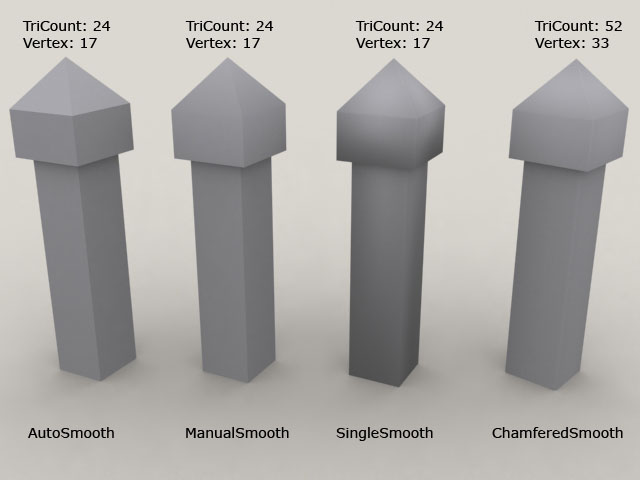
This documentation explains the importance of defining smoothing groups as well as practically showing how careless unwrapping can increase vertex count in a model which will not be visible in a 3d application like Max or Maya. The model in this example is a simple pillar (below):  Vertex count is more important for a mesh because of the simple fact that in any 3d application or game engine the mesh/model is displayed/ rendered based on the position of the vertices.  No 3d application knows about a face or an edge but creates a face based on the corresponding vertices and their position.  We cannot define vertex count for a mesh (especially for gaming model) because it depends on many things like smoothing groups, UV-Unwrap and multi-material. Moreover, the smallest face that can be rendered is a triangular face (Connecting 3 vertices), we prefer defining tri count for a model rather than vertex or face ...

Texture Memory Table

Image
Here are the two images that show the texture memory (in Kb) used when we convert or create an image in Dx1,3,5 format (with and without Mip-maps).